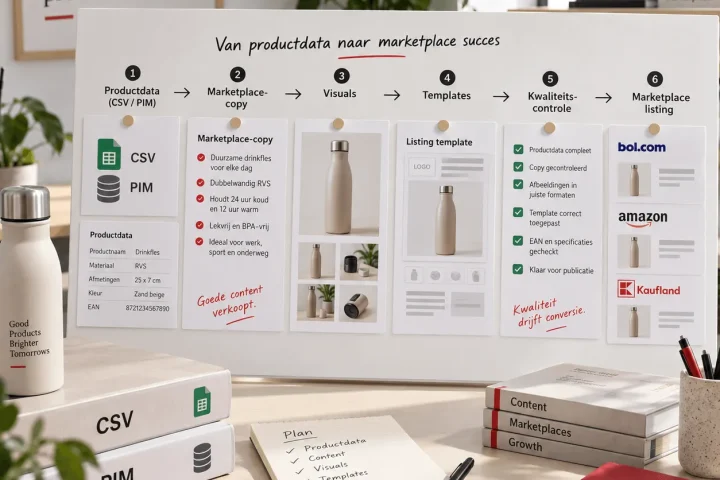



An e-commerce content system for visual content production at scale
An e-commerce content system is the way you can produce visual and written product content at scale without losing quality.
In this guide you will see how to set up e-commerce content operations in practice, with a focus on listing images, Figma components, 3D renders and AI lifestyle images that really convert.
A definition in four lines: an e-commerce content system connects product data, visual building blocks, the e-commerce content workflow and KPI steering in a closed production loop. You no longer work with separate design jobs per SKU, but with repeatable output per product line. The result is going live faster, less pressure from revisions and more stable brand consistency across your web shop and marketplaces. That is the difference between “producing a lot” and “producing at scale”.
Many teams think their bottleneck lies mainly in design capacity or copywriting capacity. In practice the biggest brake is often in how briefing, data quality, template choices and review moments hang together. If that basis is missing, every extra product creates a disproportionate amount of coordination. As a result your time to market goes up at exactly the moment you want to grow faster.
At BrandMonks we approach this topic from the execution side: how do you build a visual content machine that stays upright even with lots of variants and several channels. That is why this page is not about generic platform comparisons, but about concrete choices in structure, visual production, quality control and rollout.
The angle is deliberately practical for teams that already run volume or are growing towards it fast. Think of organisations with lots of SKUs, many variants per product family, several sales channels and recurring release peaks. In that arena, one-off optimisation only works for a short while. After that you need a system that delivers output every week that is visually strong, consistent in content and commercially usable.
Why teams get stuck as soon as volume rises
In the early phase the approach often seems to work fine. A team knows the products, the lines are short and ad hoc decisions quickly lead to results. But from a certain volume the game changes. Then you no longer get occasional noise, but structural friction that shows up straight away in turnaround time and output quality.
You usually recognise that phase by recurring signals:
- the same product category gets different image logic and claim order;
- revisions keep going round on the same mistakes per release batch;
- go-lives slip because of missing or conflicting input;
- differences between channels grow between your web shop, bol and Amazon;
- design teams produce a lot, but commercial impact lags behind.
This is not a problem of effort. It is a system problem. Without a fixed product truth, component logic and gate criteria, complexity grows faster than your team’s capacity. That gives you false scale: more assets, more pages, but less predictability in quality and conversion.
A scalable e-commerce content system prevents that pattern by fixing choices in advance about what is always fixed, what may vary in a controlled way and when output is ready to publish. That makes content production manageable instead of dependent on individuals.
What many teams underestimate is the hidden cost of structural friction. Every extra review round does not just cost hours, it also delays your go-live. That means less time to test, fewer learning loops per quarter and ultimately less chance of stable conversion growth. That is why scalable content production is not only an operational question, but also a direct commercial one.
Why much of the information on this topic falls short in practice
If you search for e-commerce content systems, you often end up with CMS overviews, software directories or broad platform comparisons. That content is useful for orientation, but usually lacks the key translation to day-to-day production at volume. You then choose a tool, but you have not yet solved your execution friction.
The core misunderstanding: a tool stack is not a production system. A stack says where data and assets live. A system determines how teams turn that data and those assets into consistent, converting output across product lines and channels.
The practical difference:
- tool question: “which software do we use?”;
- system question: “how do we deliver predictable quality at high volumes every week?”.
For BrandMonks that distinction is decisive. We do not start from “what can the platform do”, but from “what do you need to be able to deliver”. Then we work back to components, templates, workflow rules and connections. That way you prevent new tooling from becoming just a new home for old noise.
You see that difference mainly in visual execution. Many parties mostly describe systems and terms, but give little to hold on to about how to actually keep listing images, variants and lifestyle images under control at production pace. That is exactly where the real friction lies for growing teams. That is why in this guide we put the emphasis on concrete execution choices instead of abstract stack discussions.
That is why we continue topic by topic into underlying deep dives such as Figma components for e-commerce, creating listing templates and the PIM DAM content workflow for e-commerce, once you have sharpened the basic choices on this page.
The model that works: from one-off output to a closed production loop
A workable model has to do two things at once: increase speed and lower quality risk. That is why we use a compact model with four layers that reinforce each other instead of overlapping.
| Model | Strength | Weakness |
|---|---|---|
| Ad hoc production | Quick to start with little preparation | Quality and planning collapse at volume |
| Template-driven | Faster and more consistent than ad hoc | Quickly gets cluttered with exceptions without governance |
| Component-driven system | Scalable and measurable across product lines | Needs clear roles and release agreements |
| Closed production loop | Combines speed, quality and feedback | Requires discipline in the KPI cadence |
Layer 1: Product truth
Unambiguous data and claims per product type.
Layer 2: Visual building blocks
Reusable components for listing images, context images, proof blocks and variants.
Layer 3: Workflow and gates
Clear decision points for intake, production, review and publication.
Layer 4: Performance feedback
Measuring what output does commercially and feeding that back to the source.
Closed loop: product truth -> components -> workflow -> live output -> KPI feedback -> product truth. It is precisely this loop that makes scale stable, because every batch improves the system instead of just adding more work.
An important detail in this model: each layer has its own decision question. For product truth it is “is the information correct”. For components it is “is the visual logic reusable”. For workflow it is “can this safely go live”. For performance it is “does this demonstrably improve things commercially”. By fixing those questions per layer, you prevent teams from optimising past each other.
Figma components and template flows for product lines
For visual content production in e-commerce, Figma only really scales when you manage components operationally, not just design them neatly. Many teams have libraries, but lack rules for using variants, version control and a rollout rhythm. Then you get good designs locally, but no robust production flow.
A strong setup contains three fixed elements:
- a component set per content function (intro, use case, proof, comparison, CTA);
- variant rules per product type (size, material, version, bundle);
- template flows per channel (web shop, bol, Amazon) with a shared core and channel-specific execution.
This approach speeds things up especially for product lines. You do not have to build every listing from scratch, but activate predefined blocks based on product properties. That shortens turnaround time and reduces differences in interpretation between designers, copywriters and merchandisers.
A practical decision rule that often works well: only create a new component if the content function is genuinely new. If it is just a different version of the same function, build a variant within existing component behaviour. That keeps your library clean and prevents you from having twenty almost identical components after six months that nobody uses consistently any more.
Targeted deep dives:
- Figma components for e-commerce
- Creating listing templates
- Listing design templates
If this basis is right, you can absorb growth without every extra SKU becoming a new mini-project.
For enterprise-style teams with several brands or business units this is even more important. Without a shared component language you automatically start building local exceptions that seem logical in the short term, but eat up release capacity in the long term. A central component standard with controlled room for brand-specific variation keeps that tension manageable.
Listing images at scale for your web shop, bol and Amazon
Creating listing images at scale calls for a source layer that guards the same product story, with channel rules for format, order and context. Without that separation you get duplicate work and diverging claims between channels.
A practical model:
- a central product core with fixed claims and proof;
- a channel layer for image order and restrictions per platform;
- batch rollout with fixed checks on consistency and readability.
For marketplaces, image order directly affects conversion. The first images have to establish product understanding, relevance and trust straight away. A good-looking visual without decision logic rarely delivers stable performance.
That is why we often link listing production to bol listing and Amazon listing design, so visual quality and channel-specific requirements fit together from the start.
For teams that mainly run on manual corrections, this is often the fastest lever: one strong base flow for listing images, and only then fine-tuning per category. That shifts the focus from firefighting to controlled scaling.
The order of images is not a cosmetic choice but decision logic. In many categories a fixed base order works: first clear product understanding, then context of use, then proof of difference, then detail and scale. If teams apply this order consistently per channel, doubt in the orientation phase drops and you usually see stable click and conversion signals sooner.
It helps to record explicitly per channel which visual goals are dominant. On web shop pages you can fit in more context and brand story, while marketplaces usually call for faster proof and directly comparable specification images. By translating those differences into fixed image blocks in advance, you prevent teams from debating the base order again with every release. It also becomes easier to compare performance fairly, because you know which structure was applied in each batch.
3D renders as a scalable visual asset layer
In this model, 3D renders are not an “extra prettifier”, but a strategic asset layer for speed and reuse. With lots of variants, 3D lets you roll out new angles, colours, contexts and compositions faster without repeating full shoots every time.
When 3D delivers the most:
- lots of variants with small visual differences;
- frequent updates in packaging or version;
- a need for a consistent visual language across channels;
- combinations of product images, exploded views or a focus on detail.
It is important that 3D quality is not only technically good, but commercially credible. Light, material, scale and context must match what a customer expects. Otherwise you actually create a mismatch and pressure from returns.
That is why 3D works best combined with clear rules on where photorealism is required and where illustrative simplicity is enough. In many projects we combine 3D renders with AI imagery and editing of your existing product photos, so you choose the right mix per product group on speed, credibility and budget.
A simple decision aid: choose 3D when variation and reuse have the biggest impact, choose photography when texture and realism weigh heaviest, and combine both when you need scale and reliability at the same time. That hybrid approach usually gives the best balance between production speed and persuasive power on the page.
Using AI lifestyle images without losing quality
AI lifestyle images can speed up production enormously, especially for context images, seasonal variants and concept validation. But without a quality framework you shift the problem from production time to the reliability of the output. Then you get fast assets with unclear claims, visual inconsistency or deviation from the brand.
That is why we work with a hybrid model:
- AI for variation and pre-selection;
- human review on brand, realism and claim safety;
- fixed acceptance criteria per channel and product category.
Key checks:
- is the product realistic in proportion and material;
- does the setting support the value proposition instead of distracting from it;
- is the claim, implicit or explicit, legally and commercially sound;
- does the visual style match existing brand communications.
In practice AI speeds things up mainly when you link it to component flows and template choices, not as a one-off experiment. That way it becomes a predictable production step in your visual content workflow for e-commerce.
A workable quality routine is a two-step check: first a quick pre-check on technical errors and brand risk, then a commercial check on clarity and choice logic. That takes the biggest mistakes out of the flow early and keeps the final review short. Especially with large batches of variants, this prevents revision pressure from exploding late in the chain.
Deep dives:
Variant scale: from separate variants to rule-driven output
Scaling variant content in e-commerce goes wrong when fixed and variable information get mixed up. That creates copy-paste chaos: similar variants get contradictory details, image order differs needlessly and updates are repeated by hand.
A scalable variant approach splits three levels:
- fixed core: universal product truth and base claim;
- variable layer: attributes such as size, colour, material, application;
- channel layer: platform-specific layout, image order and limits.
For teams with lots of SKUs, a variant matrix works better than separate briefing rules. Per product family you record which combinations are standard, which need extra proof blocks and which exceptions require explicit approval. That way you keep control without becoming rigid.
Visually the same logic applies: not every image has to be unique, but every deviation must have a function in helping people choose or in managing expectations. That makes output more consistent and increases the chance that a customer decides faster with less doubt.
Naming also plays a bigger role here than many teams expect. If variant and asset names are not consistent, time is lost on interpretation at every handover. A strict naming convention per product family speeds up not only production, but also reporting and error analysis. That lets you find much faster later where deviations arose.
Production flow for visuals: short, sharp and output-focused
A strong e-commerce content workflow does not have to be heavy. Above all it has to prevent visual mistakes from only being discovered after going live. That is why short, clear steps work better than extensive process documents.
A practical flow for scale:
- briefing on the visual goal and channel context;
- choice of components and templates per product family;
- production with a fixed quality check on claims and image logic;
- batch publication with an immediate measurement window.
This flow only works with clear ownership of output. Who decides on product truth, who approves visuals and who determines channel fit must be fixed in advance. Otherwise doubt moves down the chain and revision pressure grows.
For teams with lots of SKUs, a fixed release cadence is usually more effective than ad hoc go-lives. You get faster feedback, fewer context switches and more stable quality per batch. That makes optimisation more direct and commercially more relevant.
PIM and DAM as a supporting layer for visual rollout
In this context PIM and DAM do not belong in the foreground, but act as an enabler behind your visual production. The core remains: which listing images, variants and lifestyle images need to go live quickly and consistently. PIM and DAM only help to feed that output reliably with the right data and assets.
So stick to a short order:
- first clear product definitions and mandatory fields;
- then component and variant logic in your visual flow;
- only then connections for handover and synchronisation.
If that order is reversed, you often get a lot of technical activity without better output. If the order is right, connections mainly speed up the release cadence and reduce errors.
Want the technical deep dive on this part? Then go on to:
- PIM DAM content workflow for e-commerce
- API connections
A KPI framework for visual output at scale
Many teams measure a lot, but steer too late. For scalable visual production a compact set of KPIs works better: you want to see quickly which image and content choices call for immediate action.
| KPI | Formula | Action on deviation |
|---|---|---|
| First-pass approval rate | Approved in first review divided by total items reviewed | Below 70 per cent: revise briefing and component instructions |
| Rework ratio | Revision hours divided by production hours | Above 25 per cent: tighten gate criteria and division of roles |
| Visual cycle time | Average days from intake to publication | Above the norm: bottleneck analysis per workflow step |
| Content mismatch rate | Return or support signals caused by content mismatch divided by total orders | Above the norm: redesign claims, visuals and specification blocks |
Indicative impact of a visual content system
Indicative index. Actual impact depends on data quality, component discipline and team rhythm.
Mini case: before and after, from one-off production to system output
To make it concrete, here is a representative example from a scaling project with product lines across a web shop, bol and Amazon. Starting position: lots of manual variants, varying image order, no fixed gate on claims and limited reusability of visuals.
Before:
- 460 active SKUs;
- 14.1 days average cycle time;
- 31 per cent rework ratio;
- many differences between channels in the visual proposition;
- rising corrections after going live.
Intervention in three steps:
- component set + template flow in Figma per product family;
- fixed gate criteria on listing images and claims;
- linking source data to visual selection and batch planning.
After two quarters:
- 780 SKUs active without extra revision chaos;
- 9.0 days cycle time;
- 19 per cent rework ratio;
- more consistency in visual language and argumentation;
- clearly faster iteration per release window.
Indicative breakdown of improvement impact in this type of project
- Components and templates
- Workflow and gates
- Data connection
- Channel fine-tuning
Indicative breakdown. The effect differs per team maturity and product mix.
Common mistakes in scalable visual content production
The most common mistakes are strikingly predictable. The advantage is that you can prevent them in a targeted way as soon as you recognise them early.
Recurring mistakes:
- tool-first implementations without fixed product definitions;
- too many exceptions, making templates unusable;
- over-standardisation, making visuals lose their persuasive power;
- AI output without a review framework for realism and claim safety;
- KPI overload without intervention rules;
- channel publication as the final step instead of part of the source flow.
A second pitfall is strategic: teams confuse volume with progress. More assets live looks like growth, but if revision pressure rises and channel consistency falls, you build up hidden costs that eat into margin later.
The solution is rarely complicated. Start with structure: what is fixed, what is variable, who decides, when can something go live, and what do you do when KPIs deviate. Once that basis is in place, scale is no longer a matter of chance.
A practical way to prioritise with limited capacity: start with the product group where volume, margin and revision pressure are highest together. That is where a better component set usually shows the fastest visible effect. Only then scale out to groups with lower impact. That way you avoid investing a lot of time in a broad rollout without a demonstrable lever.
Frequently asked questions about e-commerce content systems
What is the difference between an e-commerce content system and a CMS?
A CMS publishes content. An e-commerce content system organises how data, visuals, templates, workflow and KPI steering together produce converting output at scale.
Is this only relevant for large organisations?
No. Mid-sized teams also benefit from component flows and clear gates, precisely because they have less buffer for repair work.
When do you choose a 3D render instead of product photography?
Usually when there is a high density of variants, a need for fast updates and a need for reuse across several formats. A hybrid model of 3D plus photography often works best.
Can you use AI lifestyle images safely for listings?
Yes, provided you combine AI with human quality control on brand consistency, product realism and claim safety.
How do you prevent inconsistency between your web shop, bol and Amazon?
Work with a central product core and channel-specific output rules. Then the story stays the same, while the presentation is optimised per channel.
Which first step usually gives the fastest result?
Start with a pilot on a priority product group: a component set in Figma, a fixed quality gate and one measurement window with clear KPI actions.
Do you need to migrate your entire content landscape straight away?
No. A phased rollout usually works better: first one high-impact product family, then expand based on proven components and gate criteria. That keeps risk and revision pressure manageable.
When does outside support pay off?
When internal teams structurally lose time on coordination and repair work, or when growth in channels and range moves faster than your current production flow can handle. Then a specialist setup often delivers results faster than extra manual work.
Conclusion: from one-off visuals to predictable scale
For growing teams, an e-commerce content system is not a theoretical model, but a practical precondition for keeping visual output stable at volume. Without a system, every extra SKU means extra pressure. With a system, every SKU becomes a repeatable chance of better performance.
At BrandMonks we translate this into a workable approach: visual building blocks in Figma, listing images at scale, smart use of 3D renders and AI lifestyle images with strict quality control. Process, governance and tooling remain important, but always as an accelerator of visible output.
The real value lies in predictability. If you can go live faster with consistent, conversion-first content, you create room for more iterations, sharper choices and more stable growth across your web shop and marketplaces.
For many teams the best next step is not a big reorganisation, but a focused pilot with clear boundaries: one product family, one component set, one release cadence and a fixed KPI review after each batch. That way you quickly test what works in your context and then build on it in a controlled way. That turns one-off optimisations into a scalable model that keeps performing.
Related articles:
- Making product content scalable
- Creating product images in bulk
- Creating listing templates
- Figma components for e-commerce
- E-commerce content automation
- PIM DAM content workflow for e-commerce
Want to translate this to your range and release planning? Then book an intake call. Together we will decide which system choices have the fastest effect on speed, quality and conversion in your situation.

Melle Sikma
Helmsman
melle@brandmonks.nl