
Creating AI packshots: why e-commerce teams want to scale this faster
Creating AI packshots becomes interesting as soon as product image production becomes a question of scale.
A good AI packshot does not just help you create images faster, but above all helps you keep the same clarity, calm and product truth while ranges grow.
More and more e-commerce teams are looking for ways to roll out packshots faster. That makes sense. New product lines, extra versions, channel-specific image formats and shorter campaign rounds mean classic shoots or reshoots quickly become too slow or too expensive. Especially when a brand has many similar products, AI then seems a logical accelerator.
Yet that is also where confusion immediately arises. For one person, an AI packshot is simply a nicer cut-out product image. For another, it is about automatic retouching, replacing backgrounds, correcting shadows or generating complete packshot series from a limited number of source images. As a result, the topic online quickly shifts to tools and demos, while the real question is more practical: when are AI packshots usable for e-commerce, and how do you make sure speed does not come at the expense of reliability?
That is why in this guide we do not focus on individual generators, but on usability. What makes a strong AI packshot for e-commerce? Which source images do you need? Where does it work on product pages, in your own shop or on marketplaces? And when is AI a smart addition or alternative within the same broader layer as AI product visuals for e-commerce?
What an AI packshot is and why it differs from a regular AI product image
An AI packshot is not just any AI product image, but a functional product image created, cleaned up or scaled with the help of AI. The goal is not mainly to add atmosphere or creativity, but to show the product clearly, calmly and credibly. That functional character is exactly what makes a packshot different from a general AI visual.
With a regular AI product image, the output can often be a bit freer. As long as the image looks attractive, it quickly feels like a success. With a packshot, the bar is different. Shape, cut edges, colour, proportion, shadow, material rendering and background weigh much more heavily there. A packshot must be readable at once and should raise as little visual doubt as possible.
That is exactly why AI packshots in e-commerce are both interesting and risky. Interesting, because AI can speed up a lot of the manual work around cutting out, cleaning up, standardising and rolling out. Risky, because subtle mistakes are felt commercially sooner here. An edge that is slightly off, a shadow that looks just too artificial or a product shape that shifts ever so slightly erodes trust faster than with a lifestyle image.
For e-commerce teams this difference matters. A good packshot does not have to be eye-catching. It has to be functionally strong. If you approach AI packshots as decorative creations, you quickly pick the wrong quality framework.
What makes a good AI packshot for e-commerce strong
At its core, a good AI packshot for e-commerce does three things at once. It keeps the product credible. It makes the product quick to read. And it stays consistent with the rest of the image set. As soon as one of those three falls away, the packshot loses value.
Credibility starts with product truth. The product must look the way it actually is. Material, colour, shape, finish and proportions must hold up. Especially with packaging, technical products, cosmetics and accessories, this quickly goes wrong. AI can make an image smoother, neater or more commercial, but as soon as that leads to a different impression of the product, the packshot becomes weaker in substance.
Next comes readability. A strong packshot is calm. It keeps the product centre stage without unnecessary visual noise. The visitor must understand at a glance what they are looking at. That means lighting, contrast, background and composition support the product instead of competing with it.
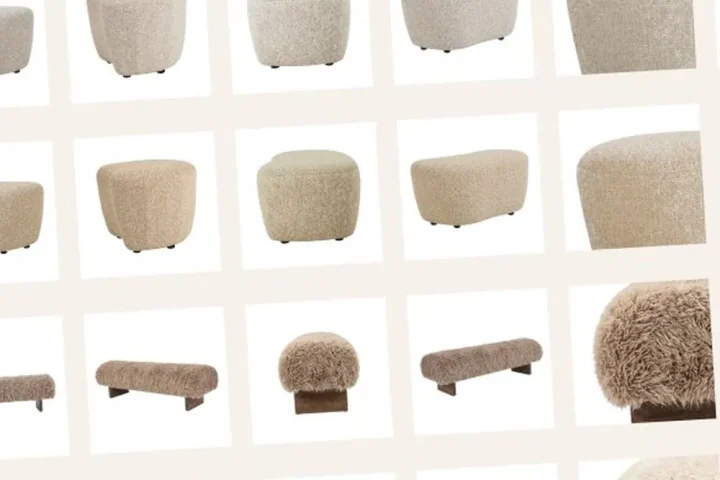
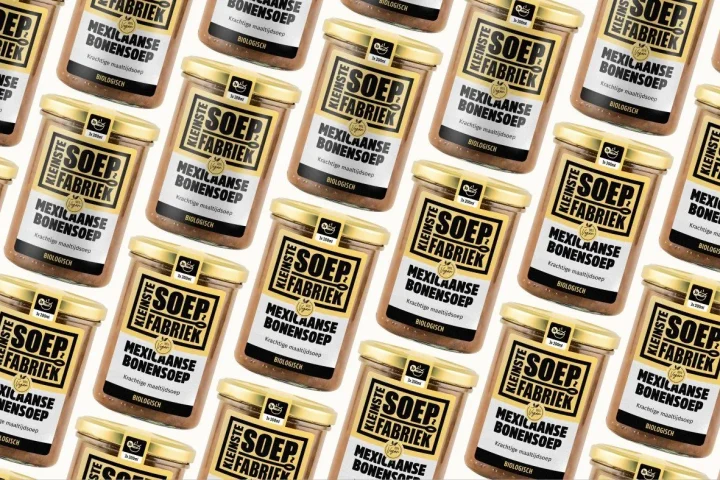
Finally, the packshot must fit within the overall visual logic of your range. If one product group is extremely clean, another full of shadows and a third looks much more artificial, differences appear that the product itself does not explain. For that broader requirement of repeatable quality, consistent product images for large ranges ties in logically.
Which source images and input you need to create packshots with AI
AI packshots rarely get better than their source material. That does not mean every product has to be completely photographed again first, but the foundation does have to be clear enough. The worse the source, the more AI has to guess. And with packshots, that guessing quickly produces inaccuracies that become commercially problematic.
A usable starting point usually includes:
- a product image in which shape and edges are clearly readable
- enough resolution to keep details and texture intact
- a stable reference for colour and material
- a clear choice for the desired packshot role: main image, detail image or channel variant
It also helps to decide in advance which elements must stay fixed. May the angle of the product change or not? Do you want a fully white background, a subtle shadow or a standardised setting? Should every packshot follow exactly the same crop? The sooner rules like these are fixed, the smaller the chance that AI creates a nice image but not the right packshot.
That is why input here is not just technical material. It is also direction. Good AI packshots come about faster when source images, crop, style rules and quality criteria already form a clear framework together.
AI packshots versus lifestyle images: when to use which
Many teams use packshots and lifestyle images as if they were interchangeable. They are not. A packshot mainly has to deliver product clarity. A lifestyle image has to add context, use or experience. As soon as that distinction blurs, the wrong image type gets the wrong job.
AI packshots are strongest when a visitor needs to see quickly what the product is, what it looks like and which details are relevant. That is about clarity, calm and immediate understanding. AI lifestyle images do something else. They add context when the product is already recognisable enough. For that division of roles, AI lifestyle images for products ties in logically.
That usually makes packshots more suitable as the base layer of an image set. They take care of the functional part of product presentation. Lifestyle images can then add to that where context or use brings extra persuasive power. As soon as a packshot tries to carry too much atmosphere, or a lifestyle image has to take over the basic work of product clarity, confusion arises.
The practical rule of thumb is simple: use packshots to secure product clarity, and use lifestyle images to add an extra layer on top. With AI this separation is especially important, because otherwise the same technology starts solving two very different image problems at once.
Where AI packshots work for product pages, your own shop and marketplace channels
AI packshots work best in places where product clarity counts commercially straight away. On product pages they are often the functional foundation. There they have to show quickly which product someone is looking at, which version is visible and what the product looks like without a visual detour. Especially above the fold and in image galleries, that first clarity carries a lot of weight.
In your own web shop or brand shop, you usually have room to combine several image types. That means a packshot does not have to do all the work, but it does have to lay the stable foundation for detail images, context images and any variants. That is exactly where AI works well when you want to roll out many products or product families in a consistent way.
On marketplace channels the emphasis is usually even more on functional clarity. Main images, crops and product focus are often more tightly regulated there. That makes AI packshots potentially interesting, but also more sensitive to mistakes. What still looks acceptable in your own shop can quickly be too artificial, too soft or too inaccurate on a marketplace channel.
So channel logic must always be taken into account. A packshot that looks technically good is not automatically suitable for every channel. That is why AI packshots should not just look good, but above all fit consistently with the requirements of the product page, your own shop and the marketplace environment.
Can AI packshots replace product photography?
The question of whether AI packshots can replace classic product photos is often put too absolutely. As if AI either takes over everything, or can barely be used seriously at all. In practice, as so often, it is more nuanced. AI is especially strong when usable source material already exists and you want to create new packshot output faster, more consistently or more cheaply.
That makes AI interesting, for example, when you:
- want to standardise existing packshots
- need new channel variants without a full reshoot
- want to roll out product families consistently and faster
- want to fix small differences in background, shadow or crop at scale
Classic product photos often remain stronger when the foundation is missing entirely, when detail-critical material rendering is indispensable or when a product is so technically sensitive that every small visual deviation immediately becomes a problem. Then AI is more of an enhancer or accelerator than a full replacement. For the broader trade-off, AI as an alternative to product photography ties in logically.
So the better question is not whether AI packshots replace photography, but which part of packshot production AI makes smarter, faster or more scalable without letting go of product truth.
Where AI packshots go wrong without quality control
AI packshots usually do not fail because they are spectacularly wrong, but because they are not quite precise enough. An edge becomes too soft. A shadow feels more artificial than expected. A glossy surface gets a different reflection. Or a package looks a little more neatly finished than it really is. These are small differences that do not always stand out at first glance, but they definitely count commercially.
With functional product images, that is especially risky. A packshot should give confidence, not ask for extra interpretation. As soon as a visitor subconsciously feels that an image does not feel quite real or stable, its persuasive power drops. That is even stronger on channels where products are compared quickly and directly.
Common risks are:
- subtle distortion of the product shape or packaging
- colour shift compared with the real product
- unnatural shadows or a too generic studio look
- inconsistent crops between similar products
- a final image that is too smooth or too perfect, making product detail feel unreliable
That is why AI packshots always need a human review moment. Not as an unnecessary extra step, but as a check on product truth, channel fit and series consistency. As soon as that check is missing, production may get faster, but the output does not necessarily get stronger.
From source image to scalable output: a workable AI packshot workflow
A good workflow for AI packshots does not start with generating, but with standardising. First it must be clear which packshot roles you need, which image rules are fixed and which deviations are still acceptable. Only then does AI really have something to speed up.
A workable flow usually looks like this:
- choose usable source images or a clear base image set
- define which packshot types are needed per product group or channel
- set fixed rules for background, crop, shadow and product angle
- generate or enhance output within that fixed quality framework
- check every image for product truth, consistency and channel fit
- save approved output as a repeatable foundation for the next rollout
Once that logic is in place, AI packshots become more than loose image experiments. They become a scalable layer within your broader image production. For larger rollouts, scaling product visuals with AI ties in logically. And when packshots form the basis for new versions or derived product images, this workflow also touches on rolling out variants visually without a new shoot.
Comparison: weak AI packshot versus strong AI packshot
The difference below shows clearly why some AI packshots deliver an advantage at scale, while others mainly cause extra correction work and doubt.
| Aspect | Weak AI packshot | Strong AI packshot | Why this works better |
|---|---|---|---|
| Product shape | Edges, proportions or packaging deviate subtly | Product stays exactly recognisable and stable | Less chance of wrong expectations |
| Readability | Image looks neat but is not really calm | Product is immediately clear and readable at the centre | Faster understanding at product page and channel level |
| Background and shadow | Artificial or varying studio look | Background and shadow consistently support the product | More trust and series consistency |
| Channel fit | The same output is used everywhere | Packshots match the product page, your own shop or marketplace channel | Fewer rejections and better use per channel |
| Consistency | Similar products still look different | Product groups follow fixed image rules | Scale becomes manageable |
| Control | Approval based on a good-looking image | Approval based on product truth and function | Better balance between speed and reliability |
Frequently asked questions about creating AI packshots
What is an AI packshot?+
An AI packshot is a functional product image created, cleaned up or scaled with the help of AI. The goal is to show the product clearly, credibly and in a channel-ready way, not mainly to add atmosphere or creativity.
How do you create packshots with AI without losing quality?+
By starting with usable source images, fixed rules for crop and background, and a strict review moment on product shape, colour, material and shadow. Without that framework, AI packshot output quickly becomes inconsistent or unreliable.
When do AI packshots work better than lifestyle images?+
When product clarity is the priority. Packshots are stronger as the base layer of an image set, because they make the product calm and immediately readable. Lifestyle images only add context or use later.
Can AI packshots replace classic packshots?+
Sometimes yes, sometimes no. AI is strong when usable source material already exists and you want to standardise or scale up faster. Classic production often remains better when detail-critical base images are missing entirely or absolute accuracy is needed.
Do AI packshots work for marketplace channels?+
Yes, but only when the output matches the channel requirements very tightly. On marketplace channels in particular, inaccuracies in crop, product focus or artificial finishing become problematic faster.
How do you scale AI packshots across a large range?+
By not just generating images, but building a system with fixed packshot roles, standard image rules, quality control and reusable approved output. Only then does speed become truly scalable.
Conclusion: AI packshots only work when product truth and scale come together
Creating AI packshots only becomes truly valuable when it delivers more than just faster output. They need to show the product credibly, calmly and repeatably, without channel fit or product truth falling away. Then they not only help speed up image production, but also make product presentation structurally stronger.
That is where the real gain lies for e-commerce teams too. Not in loose demos or attractive first results, but in a workable approach in which packshots stay scalable without losing their functional strength. Want to translate that into your own packshot flow, image rules and product groups? Book an introductory call.

Melle Sikma
Helmsman
melle@brandmonks.nl