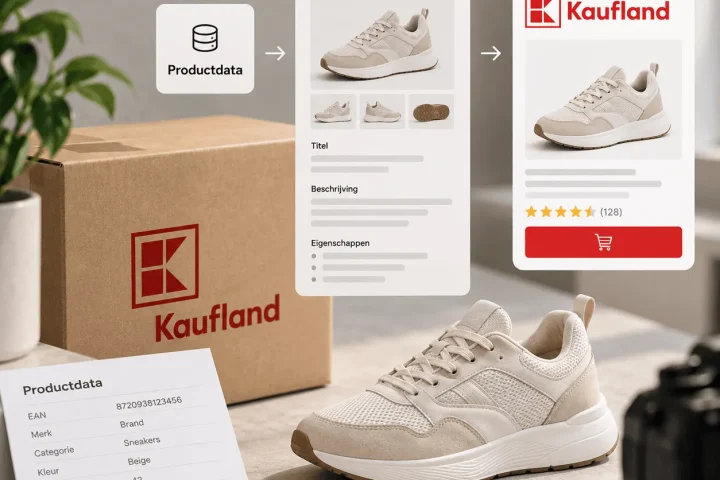


Why product data only becomes valuable in the listing
Turning product data into listing content sounds as if it is mainly about filling in fields. In reality it is a much bigger step: you are turning internal product information into content that a customer quickly understands, trusts and uses to make a buying decision.
A product feed, CSV or PIM can hold a lot of information. Think of product name, EAN, brand, size, colour, material, technical specifications, stock, price and category. But that data is not yet sellable marketplace content. A customer does not see a database. A customer sees a title, images, bullets, a description, attributes and possibly rich content. The quality of your listing depends on how well you make that translation.
That is often where it goes wrong. The product data is there, but not in the right form. Specifications are complete, but not visible in the images. Material is in a field, but not in the copy. Variants can be told apart technically, but are not logically comparable for the customer. As a result it seems as if content production is slow, while the real problem lies in the translation step.
At BrandMonks we see product data as fuel for content. The data determines what is possible, but the workflow determines what the customer ends up seeing. A good workflow links product data to listing templates, image roles, copy blocks and quality control. That way raw input becomes usable faster for Bol, Amazon, Kaufland and other marketplaces.
For the broader framework, this blog belongs with product content for marketplaces. That article covers the whole workflow. Here we focus specifically on the step from product data to concrete listing output.
Product data follows internal logic, listing content has to follow customer logic
Product data is usually set up for internal systems. An ERP, PIM, web shop or supplier thinks in fields. That is needed to manage, export and check data. But customers do not think in fields. They think in questions.
Does this product suit my situation? How big is it? What is included? What is it made of? Does it work with my device? What is the difference between this variant and the other? Is it easy to use? What happens if I choose the wrong size?
Listing content has to answer those questions. Sometimes in text. Sometimes in an image. Sometimes in an attribute. And often in a combination of the three. That is why it is too limited to only check whether product data is complete. Complete data can still produce unclear content.
An example: the dimensions “38 x 24 x 12 cm” can be technically correct. But if customers often hesitate about scale, that information also belongs in a size visual. The material “stainless steel” can sit neatly in an attribute. But if material is an important deciding factor, it also belongs in a benefit image or detail image. The set contents can be in a description, but for bundles a visual of the set is often much faster.
So the translation step starts with a simple question: which product data needs to become visible in the listing, and in what form does the customer understand that information fastest?
From CSV, feed or PIM to content model
Whether your product data comes from a CSV, product feed, web shop or PIM, the first step is the same: decide which content model fits the product type. A content model describes what information is needed to present a product well.
For a technical product, the model might consist of compatibility, specifications, installation, use and limitations. For a home product, of dimensions, material, look and feel, colour, care and styling context. For a personal care product, of ingredients, moment of use, result, skin type and packaging. For a bundle, of set contents, applications and a comparison with the separate items.
Without a content model, every listing is reinvented. With a content model, you can link data to fixed output. You then know, for example, that “dimensions” is not just an attribute, but also input for a size image. You know that “material” is input for a detail visual and a copy block. You know that “variant colour” comes back in the title, image and variant card.
This is the step in which product data is turned into product content. Not by publishing everything automatically, but by giving data meaning within the listing.
In practice you can work with three questions:
- Which fields are mandatory for publication?
- Which fields matter for the buying decision?
- Which fields need to be converted into image, text or template input?
The third question is often the most valuable. That is where marketplace content emerges that goes beyond a filled-in feed.
Turning product attributes into listing content
Product attributes are the bridge between data and content. They give structure to what you know about the product. But not every attribute deserves the same place in the listing.
Some attributes are mainly technical. Think of EAN, internal SKU or supplier code. They have to be right, but they are not meant as a customer argument. Other attributes are functional: size, weight, material, colour, capacity, power, compatibility. Those can directly influence the choice. Yet other attributes are commercial: main benefit, application, target group, moment of use or distinguishing feature.
A good workflow treats these groups differently. Technical attributes are checked. Functional attributes are made visible. Commercial attributes are translated into copy and visuals.
That stops your product page filling up with loose facts without a story. A customer does not need to see all the internal data. A customer needs exactly enough information to feel confident. So linking product data to listings also means choosing what you emphasise, what you support and what you only need in the background.
The execution differs for Bol, Amazon and Kaufland. Bol often calls for scannable content and clear product features. Amazon calls for more attention to bullets, search intent and possibly A+ content. Kaufland calls for a strong foundation in categories, attributes and clear product presentation. The data can be the same, but the content output differs per channel.
Product information into visuals: where most of the gains are
Many teams mainly use product data for text. That is a shame, because many buying questions are answered faster in an image. Turning product information into visuals is therefore one of the most important accelerators in marketplace content.
A size field can become a size visual. Material can become a detail image. Compatibility can become an overview visual. Set contents can become an unboxing image or bundle visual. A usage situation can become a context image. Variants can become a comparison or choice card.
This calls for fixed image roles. Without image roles, the translation stays arbitrary. One designer makes a lifestyle image, another an infographic, a third a detail image. All three can be good, but without a system you do not build scalable output.
So link data to image roles:
- dimensions to size image;
- material to detail image;
- application to usage image;
- benefits to benefit visual;
- set contents to bundle image;
- variants to comparison image;
- warnings or limitations to instructional visual.
That makes product data directly usable for a briefing. This is exactly where BrandMonks often adds value: not just making good-looking images, but building a workflow in which product information is translated faster into strong listing images.
This step also ties in logically with listing templates for marketplaces. Templates make sure the translation from data to image does not have to be thought up again every time.
Writing copy from product data without dry feed text
Product data can also be the basis for titles, bullets, short descriptions and product descriptions. But there is a risk: if you convert data directly into text, you often get dry feed copy. Correct, but not convincing.
Good copy uses product data as evidence. The text explains what a feature means for the customer. “Water-repellent polyester”, for example, becomes stronger when you explain that the product is suitable for daily use and easier to clean. “Adjustable from 60 to 90 cm” becomes more relevant when you make clear in which situations that adjustability is handy.
So work with copy blocks instead of loose text fields. A copy block can have a fixed function:
Product understanding
What is the product and what does the customer use it for?
Main benefits
Which features make the choice easier?
Use and context
When and how does the customer use the product?
Specifications in customer language
Which technical details need to be explained clearly?
Limitations and expectations
What does the customer need to know to avoid a wrong purchase?
By linking product data to these blocks, you can create first versions faster without the copy becoming generic. The data supplies the facts. The content structure turns them into customer-focused text.
Validating marketplace content before you publish
Quality control of product content should not only happen afterwards. If you only notice after publication that images are missing, claims are wrong or variants are unclear, every round of corrections gets more expensive.
So build in a validation step before the content goes to the marketplace. That check does not have to be complicated, as long as it is used consistently.
Check at least four layers:
Data
Are mandatory fields filled in? Are units consistent? Are category, EAN, size, material and variant information correct?
Copy
Is the title clear? Are benefits concrete? Are specifications explained in customer language? Are there no claims you cannot back up?
Visuals
Does the image set have fixed roles? Are important features visible? Is text in images readable? Does the style suit the brand?
Channel fit
Does the content suit Bol, Amazon, Kaufland or the chosen channel? Are there channel-specific requirements, limitations or opportunities that change the output?
Validation does not slow you down. It is precisely the way to make speed reliable. If the same mistakes keep coming back, you should not keep fixing them. You should adjust the source data, templates or briefing.
Practical scheme: product data to listing content
The scheme below makes the translation step concrete. Use it as a starting point for your own content workflow.
| Product data | Content translation | Output in the listing | Check question |
|---|---|---|---|
| Product type | Decide how the customer recognises the product | Title, main image and first description | Does the customer understand what this is within a few seconds? |
| Dimensions | Make scale and fit clear | Size visual, specification block and attribute | Does this prevent doubt or returns? |
| Material | Explain quality, feel and use | Detail image, benefit visual and copy block | Is it visible why the material is relevant? |
| Variant | Show differences between versions | Variant name, variant image and comparison card | Can the customer easily make the right choice? |
| Use | Translate situation and application | Usage image, bullets and description | Does the customer see themselves using the product? |
| Set contents | Steer completeness and expectations | Bundle visual, list and description | Does the customer know exactly what they will receive? |
| Compatibility | Explain the match with devices, sizes or situations | Overview visual, bullet and attribute | Is it clear what it is and is not suitable for? |
| Main benefit | Make the reason to choose concrete | Benefit visual, title accent and bullets | Is the benefit specific enough to convince? |
How BrandMonks makes the translation step scalable
The step from product data to listing content is exactly where many e-commerce teams lose time. Not because they lack information, but because the information is not yet ready for content production.
BrandMonks helps structure that translation step. We look at product data, customer questions, image roles, copy blocks, templates and quality control. Then we build a workflow in which product information moves faster to sellable marketplace output.
That can be in Figma, via templates, in a SaaS-like workflow or with a combination of data rules and content briefings. The goal is always the same: fewer loose rounds of corrections, less dependence on manual research and more consistency in how your brand shows up.
For Bol, Amazon and Kaufland, that does not mean every listing becomes the same. It means every listing is created from the same quality logic. The data gets cleaner. The images get more purposeful. The copy gets more consistent. And your team gets a repeatable route from raw product information to content that is ready for publication.
If you want to scale up marketplace content, that is the core. Not making more content by working harder, but organising product data so that better content can be created faster.

Melle Sikma
Helmsman
melle@brandmonks.nl