
In short
- UX is the floor plan and the route, UI is the fit-out and the signage
- Good UX work starts with watching real visitors, not with a pretty design
- In a web shop the biggest gains are in the product page, the filters and the checkout
UX design (user experience) is about how a website, web shop or app works: the structure, the flow and whether a visitor reaches their goal without effort. UI design (user interface) is about how it looks and feels: buttons, colours, typography, spacing and the response to a click. UX determines whether someone can order, UI determines how pleasant that feels. In a web shop, together they account for the difference between a visitor who browses and a visitor who buys.
The terms UI and UX are often mentioned in the same breath and just as often mixed up. That is a shame, because the distinction helps you see exactly where a web shop is losing out. In this article we explain the difference, show what a UI/UX project looks like and give ten examples from web shops where good design brought in more revenue straight away.
The difference between UX and UI in plain language
Compare it to a shop. UX is the floor plan: where are the shelves, how do you walk to the till, how many steps does it take to pay. UI is the fit-out: the signs, the lighting, the colour of the till and whether the “checkout” button looks like something you want to press. A shop with a bad floor plan stays awkward, however nice the fit-out. And a logical floor plan with poor signage still gets people lost.
That is why UX comes before UI in the design process. First the structure and the flow, then the styling. Do it the other way round and you design beautiful screens for a route that does not work.
What a UX designer does
A UX designer researches how visitors behave and where they drop off, determines the structure of the site, draws wireframes (sketches without styling) and tests them with real users. The work is analytical: data, interviews, click paths and hypotheses.
What a UI designer does
A UI designer turns the wireframes into the final design: colours, typography, icons, buttons, spacing and how the screen responds to a click or scroll. The work is visual, but with rules: consistency, readability, contrast and accessibility.
In practice, at many agencies, ours included, one person does both roles. The distinction is still useful because it answers two different questions: does it work, and does it feel good?
Why UI and UX in a web shop translate directly into revenue
In a web shop, the design determines whether a visitor finds the product, gets the information that removes doubt and checks out without frustration. Every hurdle, from an unclear filter to a mandatory account at checkout, costs orders. A web shop that goes from 1 to 2 per cent conversion doubles its revenue without a single extra visitor. That is why UI/UX work in e-commerce usually pays for itself quickly.
There is another reason: the competition is one click away. On bol.com and Amazon, a buyer compares your product page with five others in seconds. If you do not make it immediately clear what the product is, what it costs and why it is better, you lose the click. The same rules apply on your own web shop.
What a UI/UX project looks like: six steps
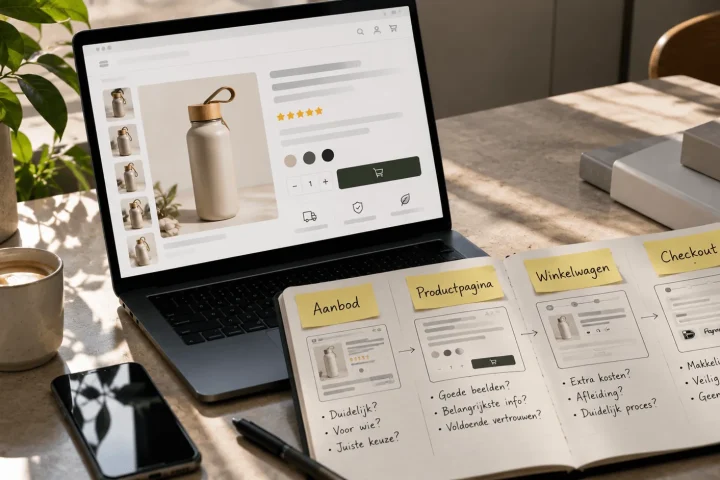
A UI/UX project runs from research to design to testing: analysis of data and behaviour, goals and user profiles, structure and wireframes, visual design, a clickable prototype you test with users, and the handover to the build with a component library. Each step delivers something you can assess before the next one starts.
Step 1: research
Where do visitors drop off? Which pages perform poorly on mobile? What do customers ask customer service? Analytics, heatmaps, session recordings and a few conversations with customers tell you more than ten opinions in a meeting room.
Step 2: goals and user profiles
What does the visitor need to do, and who is that visitor? A B2B buyer ordering forty items at once needs a different web shop from a consumer looking for one gift.
Want your design built? See how we approach web design in Groningen.
Step 3: structure and wireframes
The navigation, the categories, the layout of the product page and the steps in the checkout, drawn without styling. This is where most decisions are made, and it is the cheapest place to change something.
Step 4: visual design
The wireframes get brand identity, colour, typography and images. Each element gets rules: what a primary button looks like, what a secondary one looks like, what an error message looks like. That later becomes the component library.
Step 5: prototype and test
A clickable model, tested with five to eight real users. Five testers find most of the problems. What they do not understand, your customer will not understand either.
Step 6: handover and build
Design, components and rules go to the developers. After launch, measuring starts again: conversion per page, per device and per step in the checkout. That is where UI/UX turns into conversion optimisation.
Ten examples of UI/UX that make an immediate difference in web shops
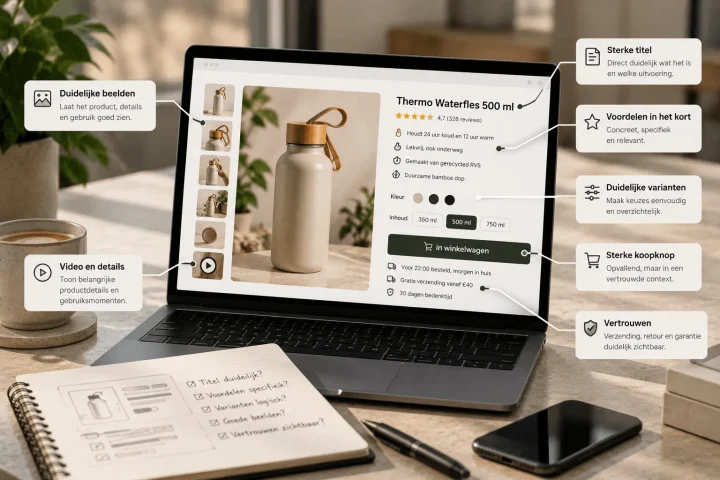
The biggest gains in web shops lie in ten recurring points: filters that work, product photos that answer questions, price and delivery time above the fold, reviews in the right place, a visible order button on mobile, a checkout without a mandatory account, clear error messages, consistent buttons, fast loading and a search function that also understands typos.
- Filters that match how customers search. Not by internal item codes, but by size, colour, price and use.
- Product photos that answer questions. How big is it, what does the back look like, how does it sit in the packaging? 3D renders make that scalable for large ranges.
- Price, delivery time and shipping costs above the fold. Surprises at checkout are the biggest reason people drop off.
- Reviews next to the order button. Not at the bottom of the page where nobody goes.
- An order button that always stays visible on mobile. More than half of your visitors are on a phone.
- Checkout without an account. Guest checkout first, account creation only after the order.
- Error messages that say what is wrong. “Invalid” helps nobody. “Enter a postcode of four digits and two letters” does.
- One style for buttons. The primary action is always the same colour, always in the same place.
- Speed. Every second of loading time costs conversion. Large images are the most common cause.
- A search function that understands typos and synonyms. Someone who searches wants to buy. Do not let that visitor end up on an empty page.
At Wallien.com we tackled exactly these points in a conversion-focused UI/UX design: from product page to checkout, with fixed rules for buttons, images and the order of information. The result is a web shop in which every page answers the same questions in the same order.
Outsource UI/UX design or do it yourself?
Small improvements, such as a clearer button or a better order of information, you can make yourself based on data. A redesign of the structure, the product page or the checkout is work for a UX designer: it requires research, testing and rules that keep the whole web shop consistent. You earn back the cost of a project once conversion rises by a few tenths of a per cent.
When choosing an agency, look for three things: do they ask for your data before designing anything, do they test with real users, and do they deliver a component library you can carry on with yourself? A beautiful design without those three is a picture, not a web shop that sells.
Frequently asked questions about UI and UX design
What is UI and UX design?
UX design determines how a website or app works and whether a user reaches their goal; UI design determines how it looks and feels.
Together they determine whether a visitor understands what to do and whether they can do it without frustration. In a web shop, that is the difference between browsing and buying.
What exactly does a UI/UX designer do?
A UI/UX designer researches user behaviour, designs the structure and screens of a website or app, and tests them with real users.
The outcome is a clickable prototype and a set of design rules that developers use to build the site. In e-commerce the focus is on product pages, filters and the checkout.
What does UI/UX design for a web shop cost?
The cost depends on the scope: a redesign of the product page and checkout is a different project from a complete web shop.
Always ask an agency for a plan in steps, so that after the research and wireframes you can decide how far to go. At BrandMonks we work in fixed phases with a price per phase.
What is the difference between UX design and conversion optimisation?
UX design shapes the experience up front; conversion optimisation improves an existing web shop based on measurements and tests.
In practice they overlap: a UX project ends with measuring, and a CRO project often leads to new design. Read more about our conversion optimisation.
How do you learn UI/UX design as a beginner?
Start by looking: study how good web shops build their product page and checkout, and learn the basic rules of typography, contrast and hierarchy.
Tools such as Figma are free to practise with. You mainly learn the craft by testing: design something, let five people use it and see where they get stuck.
UX determines whether it works, UI determines how it feels
UX design is about structure and flow, UI design about look and feel. In a web shop, together they determine whether a visitor finds, understands and orders. Always start with research and structure, design after that, and test with real users before anything is built.
The biggest gains rarely come from a completely new design, but from the ten points where visitors drop off: filters, product information, reviews, mobile, checkout and speed. Get those in order and you get more revenue from the same traffic.
BrandMonks designs and tests web shops and platforms for more than 125 brands, with fixed rules per component so you can carry on yourself. Want to know where your web shop is losing visitors? Book an introductory call and we will walk through the customer journey together.
Further reading
- Increasing conversion on your web shopTwenty changes that get you more revenue from the same traffic.
- Conversion optimisationWhere UX ends and measuring begins: our CRO approach for web shops.
- What does it cost to have a web shop built?What good design costs and why it pays for itself.

Melle Sikma
Helmsman
melle@brandmonks.nl